Telegram & alerts
Do your bookkeeping by chat and get proactive nudges.
Telegram & alerts#
AgentBook goes where you are. Connect Telegram to capture expenses, ask questions, and get proactive alerts without opening the app.
Connect Telegram#
Telegram bots are self-serve — you create your own bot in about a minute, then hand its token to AgentBook.
-
Go to Settings → Chatbots and open the Telegram card.
-
Open @BotFather in Telegram, send
/newbot, and follow the prompts to name your bot.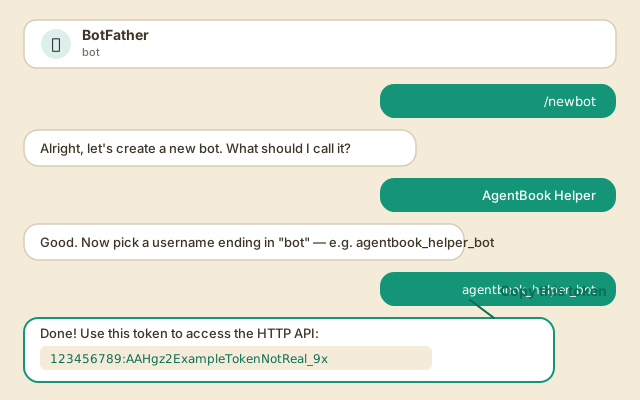
-
Copy the API token BotFather gives you and paste it into the Telegram card, then select Connect Bot.
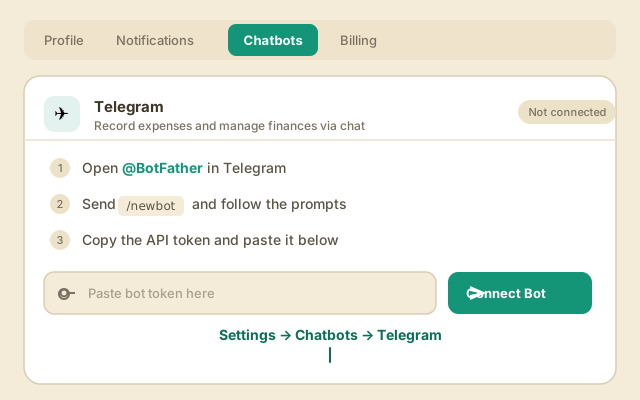
-
Open your new bot in Telegram and send
/start. Your chat is now tied to your AgentBook account — messages there act on your books.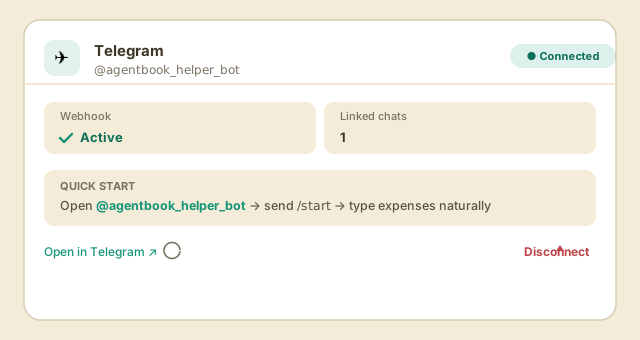
From Telegram you can snap a receipt photo, say "log $12 parking", or ask "what did I spend on software this quarter?" — the same agent, same data.
Tip: The bot is yours — only messages sent to it reach your books. Disconnect and reconnect anytime from the same card.
Proactive alerts#
The agent watches for things worth flagging and nudges you:
- Unusual spend — a charge well above your normal for that category.
- Missed deductions — categories where you likely have deductible spend you haven't logged.
- Reminders — bills coming due, quarterly tax set-asides, an invoice gone unpaid.
Tune what you receive under Configure → Notifications. Web push can be enabled too, once notification keys are set for your workspace.
Next: Ask the agent