Install the app
Add AgentBook to your phone's home screen — a full step-by-step for iOS, plus the one-tap version for Android.
AgentBook works as an installable app on both iPhone and Android — no App Store, no download. It opens full-screen, gets its own home screen icon, and can send you push notifications for things like invoice reminders and tax deadlines.
Android gets a native install prompt with a single tap. iOS doesn't let any website trigger that prompt — Apple requires a few manual taps in Safari's Share menu. Below is the full walkthrough for both.
iOS (iPhone or iPad)#
You must be in Safari — Chrome, Firefox, and other iOS browsers can't install home screen apps, since they're not allowed to use Safari's underlying engine for this.
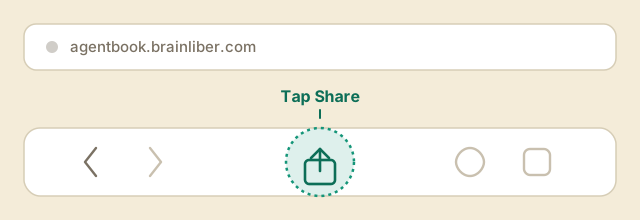
Step 1 — Tap the Share icon#
Open agentbook.brainliber.com in Safari, then tap the Share icon (a square with an arrow pointing up) in the toolbar. On iPhone this is usually at the bottom of the screen; on iPad it's in the top-right.
Step 2 — Find "Add to Home Screen"#
The share sheet opens with a row of quick-share targets at the top and a list of actions below. Scroll down through the list until you see Add to Home Screen, and tap it.
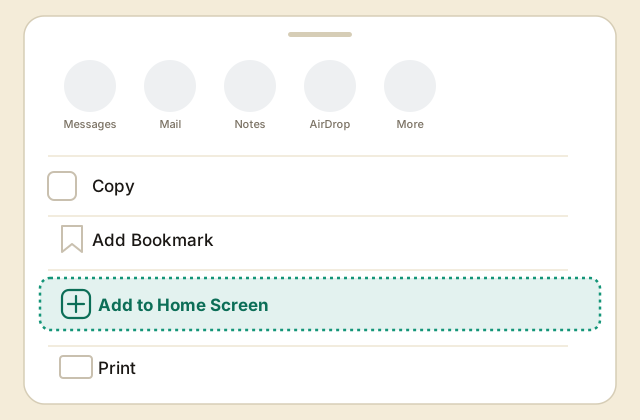
Don't see it? Tap Edit Actions at the bottom of the list and turn on "Add to Home Screen" — some versions of iOS hide less-used actions by default.
Step 3 — Confirm the name and tap Add#
iOS shows a preview with the AgentBook icon and a name you can edit (leave it as "AgentBook" unless you'd prefer something else). Tap Add in the top-right corner.
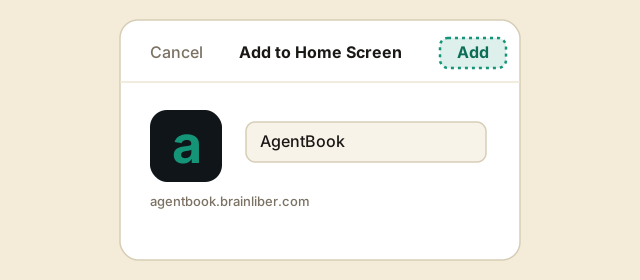
That's it — the AgentBook icon now sits on your home screen like any other app. Opening it launches full-screen with no Safari address bar.
Tip: the first time you open the installed app, iOS will ask for notification permission if you want reminders for invoices and tax deadlines. You can always change this later in iOS Settings → AgentBook → Notifications.
Android#
Any Chromium-based browser (Chrome, Edge, Brave, Samsung Internet) can install AgentBook with one tap — no manual steps required.
Open agentbook.brainliber.com and look for the install icon in the address bar (a small monitor with a down arrow). Tap it, then tap Install in the confirmation prompt.
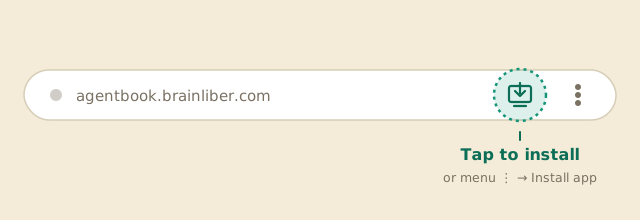
If you don't see the icon, open the browser's ⋮ menu and look for Install app (or Add to Home screen) instead — same result.
Already installed?#
If AgentBook is already on your home screen, opening it from there (rather than from a browser bookmark) is what gives you the full-screen experience and push notifications. Opening the same URL in a regular browser tab still works, but runs in the browser chrome instead.