Personal profile
Tell your agent about yourself for richer, more personal advice.
Personal profile#
Your business profile tells AgentBook how to book your transactions. Your personal profile tells your agent who you are — so its answers about taxes and personal finance are actually about your situation, not a generic rule of thumb.
Why it's worth filling in#
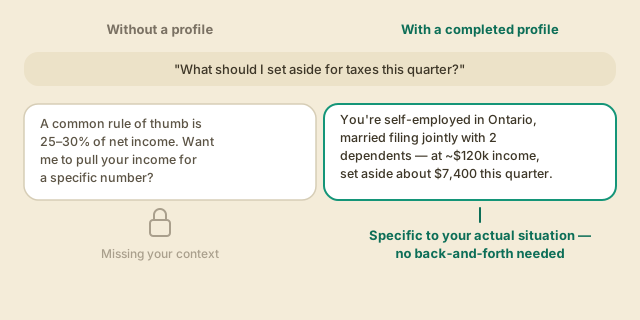
Ask a tax or money question with no profile, and the agent has to answer in the abstract or ask you to spell things out every time. With a complete profile, it already knows your filing status, dependents, employment type, and rough income — so it can give a specific, useful answer immediately, and it carries that context into every conversation, not just the ones that mention "tax."
What it doesn't ask for#
Your personal profile never asks for a government tax ID (SSN, SIN, etc.). Everything else useful to an accountant — name, date of birth, address, marital status, dependents, employment type, occupation, and a rough income estimate — but nothing that sensitive.
Completing your profile#
-
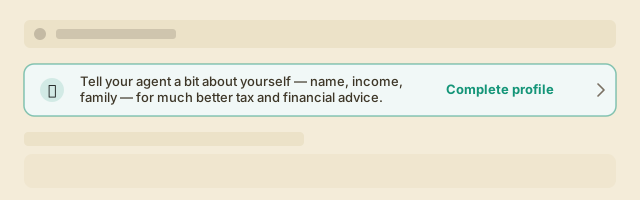
If you haven't finished it yet, you'll see a one-line reminder banner on your dashboard. It's dismissible any time — completing it later from Settings works just as well.
-
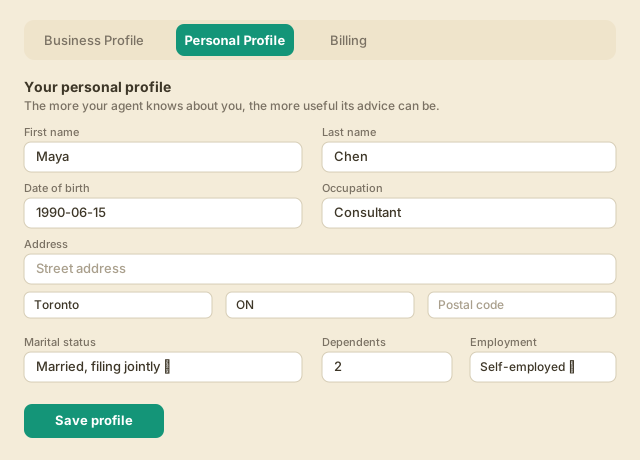
Open Settings → Personal Profile (or tap Complete profile on the banner). Fill in what you're comfortable sharing — every field is optional, though the more you add, the more specific your agent's advice gets.
-
Select Save profile. You can come back and update it any time — life changes, and so should your agent's picture of it.
Add your past tax returns too#
While you're there, the same tab has an upload past tax returns option. Adding your last 1-2 years of returns (PDF) gives your agent real history to work from — the same file the agent already checks whenever you ask a tax question in chat. It's optional, but the two together — profile plus past returns — is what turns "here's a general rule" into "here's what to do given the last two years and where you're at now."
Next: Ask the agent